Blurry or dark photos
Phone cameras refocus slowly. Hold still, tap the screen to focus on the text, and check the preview before you send.
Grosvenor Casino verification for players in Ireland: what the ID check is, how to go through it step by step, common problems and what to do if it fails.
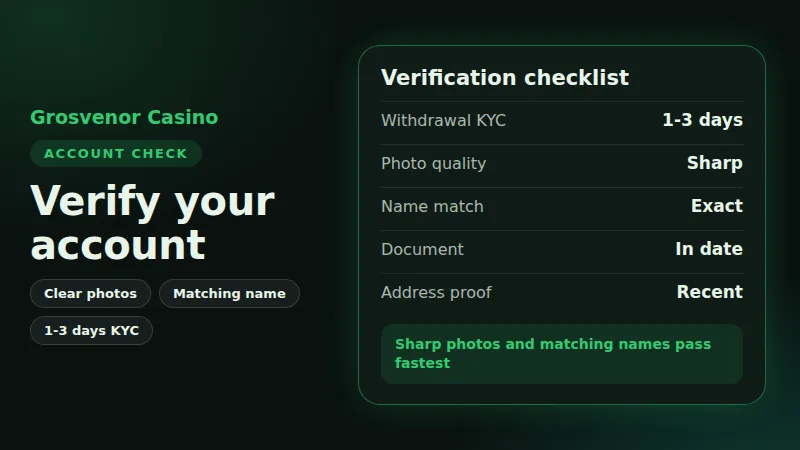
In short: Grosvenor Casino verification is an identity check: you confirm who you are and where you live by sending clear, in-date documents whose details match your account. Most checks pass first time when the photos are sharp and the names agree. For withdrawals, the KYC step is listed at 1-3 business days.
The easiest verification is the one you prepare for. Ten minutes of groundwork before you open the upload page saves days of back and forth later. The check is simple in principle: the casino compares the details in your account with the details on your documents, and if they agree, the account is confirmed. Everything you do beforehand should make that comparison obvious.
The brand does not publish a full list of accepted documents or file size limits in the sources used for this guide, so always treat the prompts inside your own account as the final word. If the page asks for something different from the list above, follow the page. Once you have everything on the table, move on to the walk-through below.
A stuck or rejected verification feels frustrating, but it is almost always fixable. The check compares what you typed when you registered with what is printed on your documents, and even a small difference can pause it. Before you try anything drastic, work out which side went wrong: the upload itself, or the information behind it.
Look at the notice in your account or inbox. It usually says which document or detail needs attention, so start there instead of guessing.
Open your profile and check the name, date of birth and address against your document, letter by letter. One missing middle name can be enough.
Use daylight, a flat dark surface and no flash. All four corners and every line of text should be readable on screen.
If a passport photo keeps failing, a driving licence may go through more easily, or the other way round, as long as it is valid.
Log out, clear the cache or update the app, then upload again. Old sessions sometimes keep showing a stale status.
If the second attempt also fails, contact support through the help section of your account and describe exactly what you uploaded.
Be patient between attempts. Sending ten uploads in a row rarely speeds things up, because every file goes into the same queue. One careful, well-prepared upload beats several rushed ones, and it keeps your account history clean while the team looks at your case.
Good to know
Put your document next to your screen before uploading and read the name aloud. If it does not exactly match your account name, fix the account details first.
Most verification delays come from a handful of repeat causes. None of them is serious, and each has a quick remedy. The table below puts the usual suspects side by side so you can spot yours in a few seconds.
| Problem | Usual cause | Fix |
|---|---|---|
| Blurry photo | Shaky camera | Retake sharp |
| Cut-off corners | Tight crop | Show all edges |
| Name mismatch | Typo or nickname | Match document |
| Expired document | Out of date | Upload valid one |
| Old address proof | Outdated bill | Use recent one |
| Glare on card | Flash reflection | Turn off flash |
| Large file | Size limit | Compress it |
Swipe sideways to see every column.
Pick the row that sounds like your case and fix just that one thing before uploading again. Changing several things at once makes it harder to see what worked.
Phone cameras refocus slowly. Hold still, tap the screen to focus on the text, and check the preview before you send.
Use the full legal name from your document when you register, not a short form or a nickname that you use day to day.
An expired passport or licence is a common reason for rejection. Renew it first, or use another valid document.
Proof of address normally needs to be recent and show your name and home address clearly, with nothing hidden.
Cutting off a corner or covering a line with your thumb makes the check fail. Keep fingers at the edges only.
If your problem is not on the list, think about what changed recently: a new address, a married name, a replaced passport. Updating your profile to the current situation and then uploading matching documents resolves most of these cases.
The walk-through below follows the usual order of an identity check. Your own screens may differ slightly in wording, so treat the account prompts as the final word and use these steps as a map of what is coming.
Log in to your Grosvenor Casino account on a stable connection. Wi-Fi at home is better than patchy mobile data.
Go to your profile or account section and look for the verification or documents page.
Confirm that your name, date of birth and address are correct before sending anything.
Lay out a valid photo ID and, if asked, a recent proof of address. Wipe the camera lens.
Photograph each document flat, in daylight, with all edges visible and no flash or reflections.
Attach the files in the slots you are shown and confirm. Wait for the on-screen confirmation.
Watch your account and inbox for the status. If more is needed, the prompt will say what.
Interface screenshots
Screens of the account area, the document upload page and the confirmation message, shown in the same order as the steps above.
When you compare the screenshots with your own screen, look at three things: where the verification page sits in the account menu, which documents it asks for, and what the status label says after you submit. If those three match, you are on track.
Identity checks are a normal part of a regulated casino account and can come up at any stage, not only after a big win.
A rejected upload is just a request to try again. Send a clearer picture and the check carries on.
Screenshots and scans of screens often lose detail. A direct photo of the physical document is much safer.
The name must match your document. A nickname or a shortened version is a frequent cause of delays.
It does not. It protects your account and is part of how a licensed casino confirms that players are adults.
Repeated uploads of the same bad photo add nothing. One good upload is quicker than five poor ones.
Grosvenor Casino operates under a UK Gambling Commission remote casino licence, and identity checks are part of that kind of regulated setup. Seeing them as routine, rather than as a hurdle, makes the whole thing less stressful, and once your account is confirmed you can focus on playing.
Never send your documents by any channel other than the upload page in your own logged-in account, and never share your password.
Verification and withdrawals are closely linked. Having your documents confirmed early means that, when you want to cash out, the KYC step is already behind you. For withdrawals, the processing time for KYC is listed at 1-3 business days, and card payouts are listed at the same range. If you pay by card, use a debit card, since credit cards have been banned in Ireland since 5 February 2026.
Verification also supports safer play. Knowing that only the verified account holder can use the account is one layer of protection. Alongside it, set deposit limits that suit you and take breaks when you need them. In Ireland, free support is available from gamblingcare.ie, problemgambling.ie and gamblingtherapy.org if gambling stops being fun. Winnings are not taxed for players in Ireland. To learn how information on this site is checked, see the Fact-Checking Process.
Once your account is confirmed, the fun part begins. The lobby brings together studios whose games are listed for the brand, and you can browse them at your own pace. Take a look at the games page for an overview, or try titles risk-free in the demo mode first to get a feel for the pace of a slot before you play for real money.
A verified account also makes later steps smoother. Deposits, withdrawals and any account changes tend to go more easily when the identity check is already done and your details are consistent. Keep your profile up to date, for example after a move or a change of name, so the information always matches your documents.
Checked facts
Read the terms in the cashier, set your limits and start when the facts match what you expect.